
Read any MT5 backtest
in seconds.
Meet StrategyLens
Detailed stats, an interactive equity curve, and a full trade journal — plus prop-firm compliance checks and shareable analysis snapshots. 100% client-side; your trade data never leaves the browser.
Reaper Suite · 27 strategies
Imported 2h ago
Equity Curve
Everything you need, nothing you don't.
Every metric that matters.
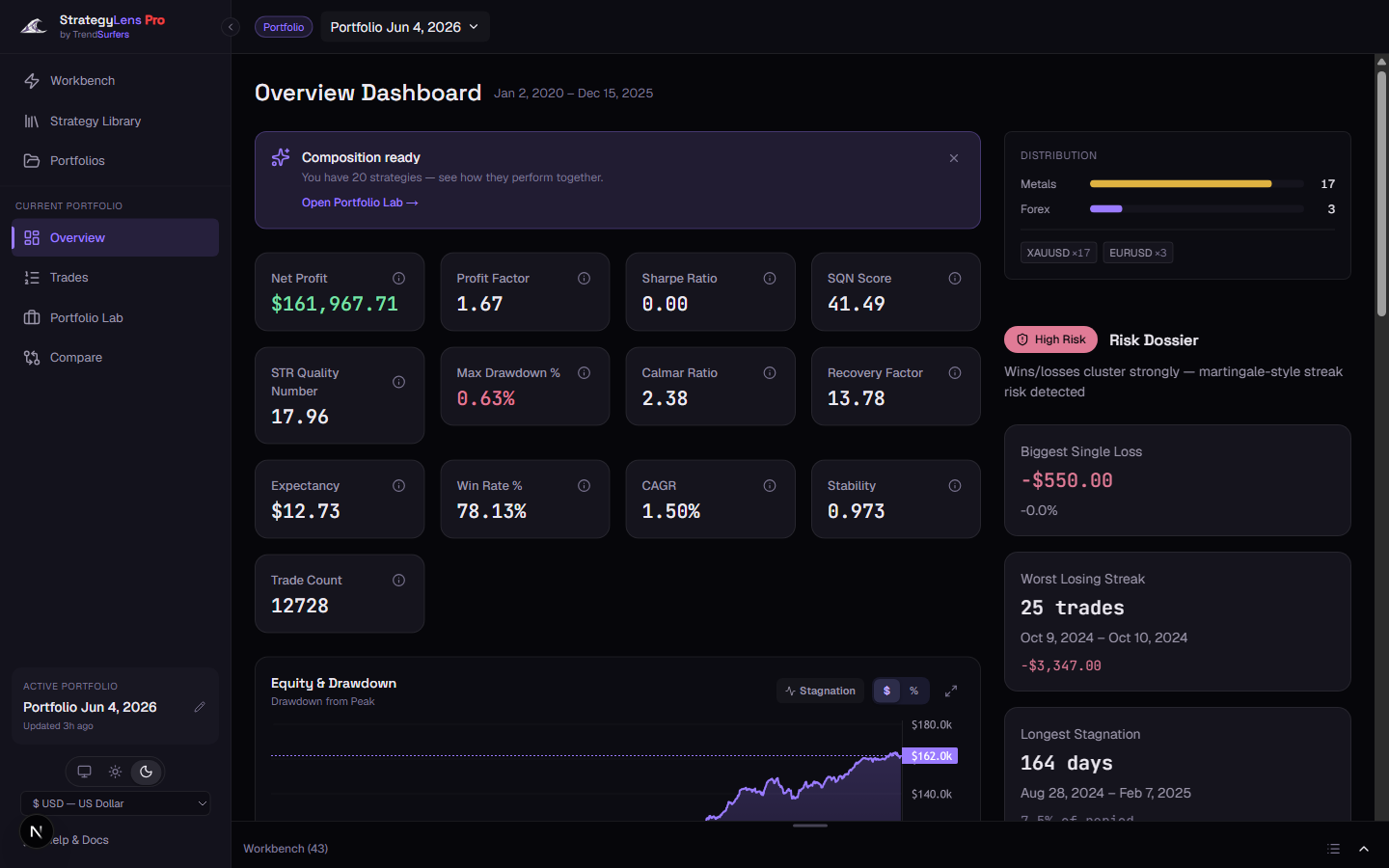
Sharpe ratio, SQN, max drawdown, profit factor, win rate, expectancy — computed precisely, right in your browser, the moment you drop in a report.
Full visual breakdown, every trade.
Interactive equity curve with drawdown overlay. Sortable trade journal with open/close times, P&L, fees, and R-multiples. Filter by date range or trade direction.
See where it hurts.
Peak-to-valley drawdown, worst losing streaks, and the longest stagnation periods — surfaced automatically so you see a strategy's real risk profile at a glance.
Nothing leaves your machine.
All HTML parsing and statistical computation runs directly in your browser via WebAssembly. Your trade data stays on your machine — no account, no server, no cloud. The only thing that ever leaves is a snapshot you explicitly choose to share.
No login. No trial. Just open it.
StrategyLens is completely free. Drop in an MT5 HTML backtest report and get your full analysis in seconds. No account required.
Check the rules before you scale.
Review drawdown, loss streaks, risk limits, and trade profile against prop-firm style constraints before a backtest becomes a live allocation candidate.
Send the readout, not the terminal.
Share analysis snapshots and report exports with partners, clients, or review channels so everyone sees the same risk picture without needing your MT5 workspace.
Point an AI at your own backtests.
A free, local MCP server plugs StrategyLens straight into Claude, or any MCP client — rank, compare, and combine your MT5 backtests on command. Every metric comes from the same engine that powers the web app, precise, not estimated by the model, and only the results you ask for reach your AI.
- Keep your MT5 reports in one folder — .htm, .html, .xlsx or .csv, plus TrendSurfers .tspa archives.
- Paste the config, pointing it at that folder, then restart your MCP client.
- Ask your questions. StrategyLens reads the reports from disk — your reports stay on your machine.
Try asking: “Which of my backtests has the best Sharpe ratio with drawdown under 15%?”
Needs Node 20+ on PATH. Adding another folder later means editing the config and restarting again.
One upload. Full picture.
Real screenshot — not a mockup. Drop any MT5 HTML report and see this view in seconds.
Ready to scale?
Love StrategyLens? It's built right into Portfolio Manager — backtest, right-click any result, and it's there.